
 Main Menu
 Catalogs
 Cities
 Search
 Sim Time

 City Status
 Did You Know...
 FreeSO Blog
 Quick Links
 Game Guides
 |
Skinnable Objects |
| Introduction | Skinning an Object | Available Objects | |
 Back to Custom Content | Back to Custom Content |  Print Page Print Page |

|
Introduction There are several objects in game that allow you to drag a custom picture over top to have it "injected" inside. Once you inject a picture into an object, it will skin the object to replace the default look. One example of a skinable object is the Sandwich Board Sign. Skinning an Object To inject a custom picture into an object, pick up the picture in buy mode and place it overtop of the object. If you are skinning an object which hangs on a wall, place the picture just infront of it. Your picture will now be in place of the default look the object had. To remove the picture from the object, click on it in live mode and select "Eject Custom Bitmap". The picture will then appear beside the object in its original form. 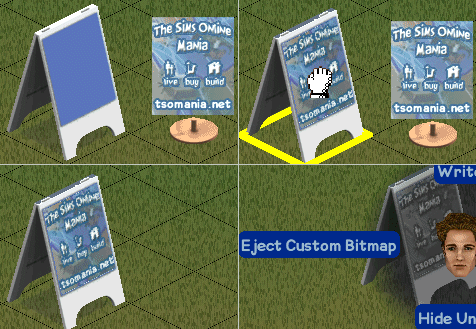 Process to Skin an Object Available Objects Here are all the skinnable objects available. Click a thumbnail for the catalog entry.
|


